
School Management System
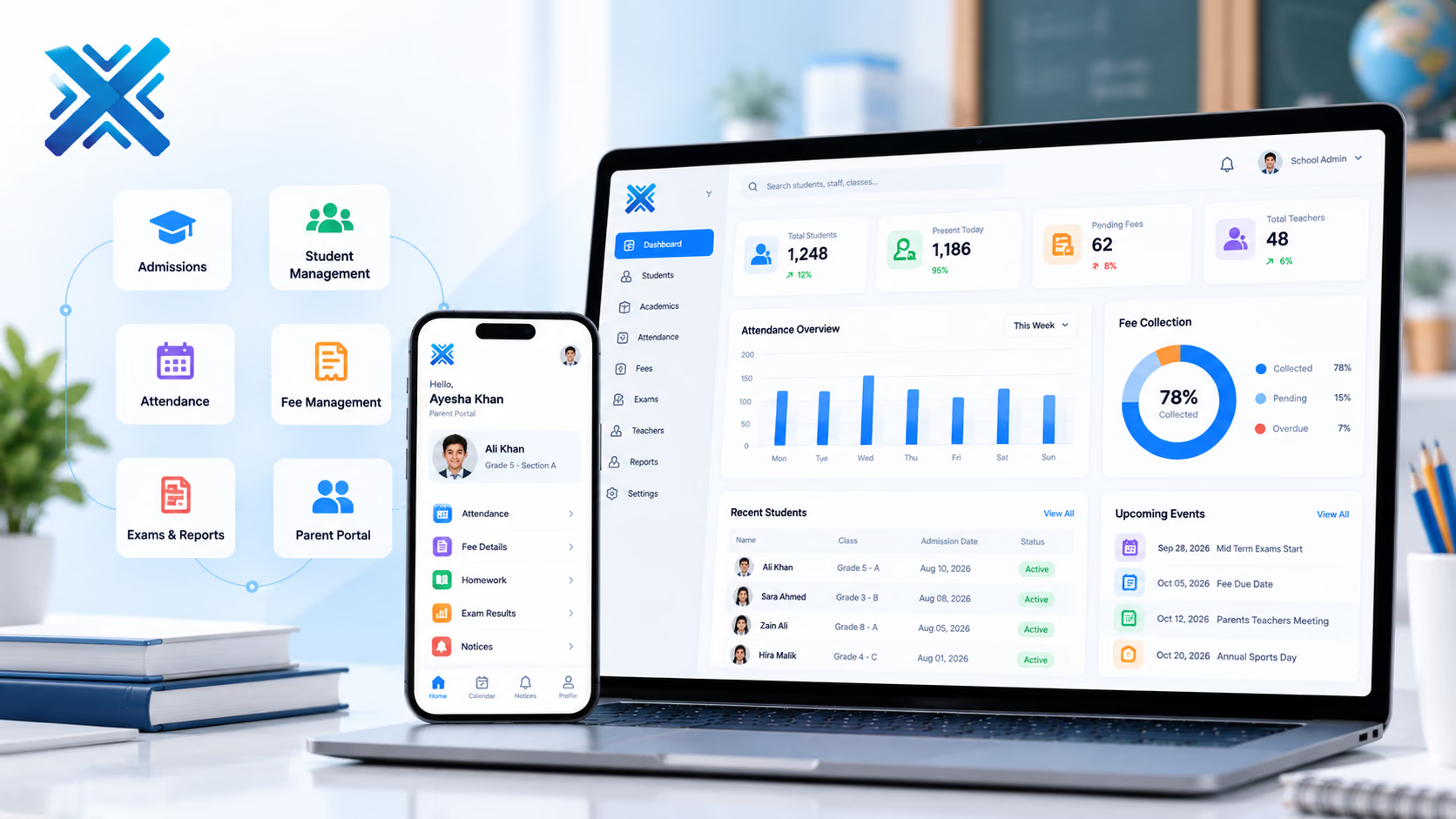
Admissions, attendance, fees, and exams in one student record for the office, teachers, and parents.
Industry Platforms
The platform
Schools, colleges, and education groups that still run fees, marks, and parent messages in separate tools.
A school system has to survive the first week of term and the fee due date, not only a demo. XiteHub designs SIS so a student who is admitted already has a class, a fee schedule, and a parent login. Attendance and homework sit on that same ID. Exams and report cards pull from the markbook, not a rebuilt spreadsheet each term. The office can see who is unpaid without calling the class teacher. Parents get notices and fee status without a separate WhatsApp broadcast list that nobody updates.
Book a walkthroughThe gap
What is usually broken
Admissions live in paper or a form. The office tracks fees in a sheet. Teachers mark attendance in a register. Parents only hear when something is already late.
Approach
How we fit it
XiteHub builds a school platform around the student file: enrolment, class, fee plan, and academic year. The office, teachers, and parents see the slice they need. We have worked with education-facing products and treat the academic calendar as a first-class object, not a plugin. Multi-campus groups share a student ID with campus-level fees and timetables.
Capabilities
What ships in the first release
- 01
Admissions, enrolment, and student documents on one file
- 02
Classes, sections, timetable, and teacher assignments for the academic year
- 03
Attendance that parents and the office can see the same day
- 04
Fee plans, invoices, receipts, and arrears by student or family
- 05
Exam schedules, gradebook, and report cards from the same marks
- 06
Parent and teacher portals for notices, homework, and meeting requests
Modules
How the platform is cut
We go live on the slice you need first. The rest follows when the operators are ready.
01
Student information
Enrolment, guardians, documents, and the academic year. Withdrawals keep history; they do not delete the file.
02
Academics
Classes, subjects, timetable, and teacher load. Substitutions are recorded, not whispered.
03
Fees
Plans, discounts, invoices, and receipts. Sibling or staff concessions are rules, not a sidebar note.
04
Exams and reports
Assessment components, marks entry, and printable report cards the principal can lock.
05
Portals
Parents see attendance, fees, and notices. Teachers see their classes. Admin sees the campus.
Why it lands
What changes for the team
- 01
The office stops reconciling three lists to know who is in which class
- 02
Fee arrears are a report, not a memory
- 03
Teachers mark once. Parents see it without a phone tree
- 04
Report cards are generated from the gradebook, not retyped
- 05
A new campus can inherit the structure without a second product
- 06
Notices go to the right parents, not a stale broadcast group
Rollout
How we implement it
Workshops first, then a live slice, then the rest of the modules. Operators sign off before we cut over.
01
Calendar and structure
Map campuses, classes, fee cycles, and who may edit marks or money.
02
Student import
Clean the current register and guardian contacts before the first login is issued.
03
Office first
Ship enrolment and fees so the front desk can leave the sheet this term.
04
Teachers
Attendance and gradebook next, timed to a term start, not mid-exam week.
05
Parents
Open the portal once the office trusts the data. Train a small parent group first.
06
Term close
Lock report cards, archive the year, and roll promotions with a checklist, not a weekend panic.
Fit
Where this platform belongs
- 01
A K-12 school replacing fee software that does not talk to attendance
- 02
A college that needs course enrolment and exam marks on the same student
- 03
A group with two campuses that still merge reports in Excel
- 04
A school that wants parents on a portal instead of a staff-run WhatsApp list
Connects
Systems this sits beside
- Payment gateways for fee collection
- SMS or email for notices and due reminders
- Existing website for admissions forms
- Accounting for fee journals, if finance wants them
- ID or biometric devices for campus attendance, when you use them
Stack
What we usually ship it on
- Laravel
- PostgreSQL
- React
- Next.js
- Redis
- REST APIs
- Docker
- AWS
Hosting
Where it can live
- 01
Cloud hosted
Managed on AWS, Azure, or GCP when you want updates handled for you.
- 02
On-premise
Private install in your rooms when control or compliance requires it.
- 03
Hybrid
Mix cloud and on-premise across teams or sites when one model is not enough.
FAQ
Questions, answered
Scope, ownership, and how we cut over School Management System without a weekend freeze.
Continue
More in Industry Platforms
- 01
Hospital Management System
Appointments, records, pharmacy, lab, and billing on one patient file for clinics and hospital floors.
- 02
E-Commerce Solutions
Storefront, catalog, checkout, and the admin your team will actually use, on Shopify, WordPress, or a stack we build.
- 03
AI Automation Platform
Workflows that read documents, route work, and answer from your own files, with a person still on the exceptions.
- 04
ERP Software
One ledger for finance, purchasing, inventory, and operations so each department is not running its own spreadsheet.

Need a walkthrough of School Management System?
Book a free consultation with our solutions architects. We'll map requirements and share a clear roadmap within 48 hours.